

r5r: Accounting for monetary costs
Contents
r5r: Accounting for monetary costs#
This tutorial shows how to configure and use custom fare rules in order to account for monetary travel costs when generating travel time matrices and accessibility estimates with the r5r package.
Credits:
This tutorial is a direct copy from r5r -documentation made by r5r contributors.
Getting started#
Run these codes in Binder#
Before you can run this Notebook, and/or do any programming, you need to launch the Binder instance. You can find buttons for activating the python environment at the top-right of this page which look like this:

Working with Jupyter Notebooks#
Jupyter Notebooks are documents that can be used and run inside the JupyterLab programming environment containing the computer code and rich text elements (such as text, figures, tables and links).
A couple of hints:
You can execute a cell by clicking a given cell that you want to run and pressing Shift + Enter (or by clicking the “Play” button on top)
You can change the cell-type between
Markdown(for writing text) andCode(for writing/executing code) from the dropdown menu above.
See further details and help for using Notebooks and JupyterLab from here.
1. Introduction#
Considering the monetary costs of public transport trips in the calculation of travel time matrices and accessibility estimates is a major challenge faced by researchers and planning practitioners. Each public transport system can have its own set of rules for calculating fares, with varying levels of complexity. Moreover, there are important trade offs between travel time and monetary costs across multiple trip alternatives and are currently not captured by any multimodal routing engine, except for R5.
R5 has native capabilities and an open architecture for creating and including fare structures in routing models, making it possible to estimate travel time matrices and accessibility estimates simultaneously considering different combinations of time and monetary cost cutoffs. The main challenge, however, is that a specific fare structure for each city needs to be programmed in Java and tightly integrated into R5, making this functionality out of reach for those who do not know how to code in Java (i.e. most of us!).
To help tackle this challenge, r5r has a simple generic rule-based fare
structure that can be configured via a predefined set of properties and rules
that can be set directly from R or using external tools such as text editors and
spreadsheets. This approach currently available in r5r is able to account for
the monetary costs of public transport systems that follow a simple set of fare
rules according to which the cost of a journey depends on combinations of modes
(see details below).
This tutorial shows the features of r5rs fare structure. It also uses a
reproducible example to demonstrate how to configure the fare structure to
account for monetary costs when generating travel time matrices and accessibility
estimates with r5r.
1.1 Details#
A common feature among many public transport services is the possibility of
discounted transfers, when passengers can use a single ticket for a trip composed
of multiple rides sometimes combining different transport modes. Such trips usually
come with a discount in the second or subsequent fares, as well as a limit on the
number of discounted transfers the user can make and/or a time limit for using that
discount. This is the type of fare structure currently covered by r5r.
We acknowledge that there are several types fare rules that vary from one public
transport system to another. According to these rules, the cost of a journey can
differ, for example, depending on: different costs for each trip leg, transport
mode or route; distance- or zone-based fares; different fares for types of riders
(e.g elderly people or students) or time of the day (e.g. peak and off-peak hours);
among many others rules. As such, taking all of these possible rules into
consideration when calculating the monetary cost of multimodal can be quite
difficult. r5r currently does not cover these more complex fare rules.
The fare calculator currently available in r5r is not intended to be a robust
solution that can take into consideration all public transport systems and their
specific fare rules. That would be a Herculean task. The features included in
r5r’s fare calculator are inspired by our empirical observations of Brazilian
public transport systems, and is meant to be used mainly in the Access to Opportunities project. Everyone else is welcome to use it, if the current features suit their needs.
obs. The GTFS format has some features for specifying public transport fares, but
those features are quite limited and are not enough for adequately representing
many use cases. A new version of that specification is currently being developed
Fares V2, but it may take some
time for it to be approved and for transport agencies actually start providing
GTFS feeds with full fare information.
2. Reprex: the public transport system of Porto Alegre#
In this tutorial, we will be using the sample data set for the city of Porto
Alegre (Brazil) included in r5r. Before we start, we need to increase the memory available to Java and load the packages used in this tutorial
# Install h3jsr package
install.packages('h3jsr')
also installing the dependency ‘tidyr’


Updating HTML index of packages in '.Library'

Making 'packages.html' ...
 done
options(java.parameters = "-Xmx5G")
library(r5r)
library(sf)
library(data.table)
library(ggplot2)
library(patchwork)
library(dplyr)
library(h3jsr)
Porto Alegre has a relatively straightforward public transport system, where the vast majority of the population that rely on transit ride buses. The city also has a metropolitan rail service that connects the city center to the neighboring northbound municipalities. That system can be seen in the map below.
# setup and load Porto Alegre multimodal network into memory
# system.file returns the directory with example data inside the r5r package
# set data path to directory containing your own data if not using the examples
data_path <- system.file("extdata/poa", package = "r5r")
r5r_core <- setup_r5(data_path)

# load transit network as an SF
transit_network <- transit_network_to_sf(r5r_core)

# map
ggplot() +
  geom_sf(data=transit_network$routes, aes(color=mode)) +
  theme_void()
Using cached R5 version from /home/hentenka/.conda/envs/mamba/envs/r5/lib/R/library/r5r/jar/r5-v6.7-all.jar


Using cached network.dat from /home/hentenka/.conda/envs/mamba/envs/r5/lib/R/library/r5r/extdata/poa/network.dat

According to the fare rules in Porto Alegre, as in most Brazilian cities, the cost a a journey depends on a combination of number of subsequent trips and/or transport modes. In the case of Porto Alegre, the fare rules are as follows:
Each bus ticket costs R$ 4.80
Riding a second bus adds R$ 2.40 to the total cost.
Subsequent bus rides cost the full ticket price of R$ 4.80.
Each train ticket costs R$ 4.50. Once a passenger enters a train station, she can take an unlimited amount of train trips as long as she doesn’t leave a station.
The integrated fare between bus and train has a 10% discount, which totals R$ 8.37.
In the following sections, we will demonstrate how to implement those rules within r5r’s fare calculator.
3. Setting up the fare structure#
There are three support functions in r5r to help users configure the fare structure:
setup_fare_structure()analyses the study area’s GTFS and builds a ‘skeleton’ fare structure structure with the parameters that need to be set;write_fare_structure()andread_fare_structure()allow saving the current fare structure settings to disk, and reading them back into memory. The settings are saved as standard.csvfiles inside a zipped folder. These files can be edited outside the R session using external text editors and spreadsheet software, for user’s convenience. First, we need to callsetup_fare_structure(), providing three parameters: the currentr5r_coreobject, abase_fareused to populate the fare structure, and thebyparameters that identifies what is the main property of the route that defines the different fares. In the example below, thebase_fareis the standard bus ticket price of R$ 4.80. We are also stating thatby = "MODE", so that each transport mode has its own fares and integration rules. Users can also create a fare structure where fare rules of routes differ by"AGENCY_ID"or"AGENCY_NAME", or simply setby = "GENERIC"when the entire system follows the same rules.
fare_structure <- setup_fare_structure(r5r_core,
                                       base_fare = 4.8,
                                       by = "MODE")
Now let’s check the contents of the fare_structure object. We can see below that it is simply a list with a few properties and data.frames.
head(fare_structure, n=7)
- $max_discounted_transfers
- 1
- $transfer_time_allowance
- 120
- $fare_cap
- Inf
- $fares_per_type
A data.table: 2 × 5 type unlimited_transfers allow_same_route_transfer use_route_fare fare <chr> <lgl> <lgl> <lgl> <dbl> BUS FALSE FALSE FALSE 4.8 RAIL FALSE FALSE FALSE 4.8 - $fares_per_transfer
A data.table: 4 × 3 first_leg second_leg fare <chr> <chr> <dbl> BUS BUS 4.8 RAIL BUS 4.8 BUS RAIL 4.8 RAIL RAIL 4.8 - $fares_per_route
A data.table: 117 × 8 agency_id agency_name route_id route_short_name route_long_name mode route_fare fare_type <chr> <chr> <chr> <chr> <chr> <chr> <dbl> <chr> EPTC Empresa Publica de Transportes e Circulação 1112 1112 HIPICA / TRISTEZA BUS 4.8 BUS EPTC Empresa Publica de Transportes e Circulação 149 149 ICARAI BUS 4.8 BUS EPTC Empresa Publica de Transportes e Circulação 165 165 COHAB BUS 4.8 BUS EPTC Empresa Publica de Transportes e Circulação 168 168 BELEM NOVO(VIA TRISTEZA) BUS 4.8 BUS EPTC Empresa Publica de Transportes e Circulação 173 173 CAMAQUA BUS 4.8 BUS EPTC Empresa Publica de Transportes e Circulação 1761 1761 SERRARIA / RODOVIARIA / VIA MENDES OURIQUES BUS 4.8 BUS EPTC Empresa Publica de Transportes e Circulação 179 179 SERRARIA BUS 4.8 BUS EPTC Empresa Publica de Transportes e Circulação 1795 1795 SERRARIA / GUAIBA / DIARIO BUS 4.8 BUS EPTC Empresa Publica de Transportes e Circulação 186 186 LIBERAL BUS 4.8 BUS EPTC Empresa Publica de Transportes e Circulação 187 187 PADRE REUS BUS 4.8 BUS EPTC Empresa Publica de Transportes e Circulação 188 188 ASSUNCAO BUS 4.8 BUS EPTC Empresa Publica de Transportes e Circulação 195 195 T V BUS 4.8 BUS EPTC Empresa Publica de Transportes e Circulação 210 210 RESTINGA NOVA BUS 4.8 BUS EPTC Empresa Publica de Transportes e Circulação 211 211 RESTINGA VELHA BUS 4.8 BUS EPTC Empresa Publica de Transportes e Circulação 244 244 SANTA TERESA BUS 4.8 BUS EPTC Empresa Publica de Transportes e Circulação 2441 2441 SANTA TERESA / VIA MARIANO DE MATOS BUS 4.8 BUS EPTC Empresa Publica de Transportes e Circulação 253 253 RENASCENCA BUS 4.8 BUS EPTC Empresa Publica de Transportes e Circulação 2541 2541 EMBRATEL - CANUDOS - CASCATINHA BUS 4.8 BUS EPTC Empresa Publica de Transportes e Circulação 255 255 CALDRE FIAO BUS 4.8 BUS EPTC Empresa Publica de Transportes e Circulação 256 256 INTENDENTE AZEVEDO BUS 4.8 BUS EPTC Empresa Publica de Transportes e Circulação 2561 2561 NAZARETH BUS 4.8 BUS EPTC Empresa Publica de Transportes e Circulação 260 260 BELEM VELHO / OSCAR PEREIRA BUS 4.8 BUS EPTC Empresa Publica de Transportes e Circulação 262 262 JARDIM V. NOVA BUS 4.8 BUS EPTC Empresa Publica de Transportes e Circulação 263 263 ORFANOTROFIO BUS 4.8 BUS EPTC Empresa Publica de Transportes e Circulação 264 264 PRADO BUS 4.8 BUS EPTC Empresa Publica de Transportes e Circulação 2671 2671 LAMI / VAREJAO(VIA EDGAR PIRES DE CASTRO) BUS 4.8 BUS EPTC Empresa Publica de Transportes e Circulação 268 268 BELEM NOVO(VIA CAVALHADA) BUS 4.8 BUS EPTC Empresa Publica de Transportes e Circulação 271 271 AMAPA BUS 4.8 BUS EPTC Empresa Publica de Transportes e Circulação 272 272 MORADAS DA HIPICA BUS 4.8 BUS EPTC Empresa Publica de Transportes e Circulação 273 273 BELEM NOVO / HIPICA BUS 4.8 BUS ⋮ ⋮ ⋮ ⋮ ⋮ ⋮ ⋮ ⋮ EPTC Empresa Publica de Transportes e Circulação 862 862 RUBEM BERTA (CAIRU) BUS 4.8 BUS EPTC Empresa Publica de Transportes e Circulação B02 B02 LEOPOLDINA / AEROPORTO / INDUSTRIAS BUS 4.8 BUS EPTC Empresa Publica de Transportes e Circulação B51 B51 PARQUE / POSTAO IAPI / H CONCEICAO BUS 4.8 BUS EPTC Empresa Publica de Transportes e Circulação B511 B511 PARQUE / H CONCEICAO / POSTAO IAPI BUS 4.8 BUS EPTC Empresa Publica de Transportes e Circulação B56 B56 PASSO DAS PEDRAS / AEROPORTO BUS 4.8 BUS EPTC Empresa Publica de Transportes e Circulação C1 C1 CIRCULAR CENTRO BUS 4.8 BUS EPTC Empresa Publica de Transportes e Circulação C2 C2 CIRCULAR PRACA XV BUS 4.8 BUS EPTC Empresa Publica de Transportes e Circulação C3 C3 CIRCULAR URCA BUS 4.8 BUS EPTC Empresa Publica de Transportes e Circulação D67 D67 LAMI VIA BELEM NOVO / DIRETA BUS 4.8 BUS EPTC Empresa Publica de Transportes e Circulação D72 D72 DIRETAO / VIA STA. ROSA BUS 4.8 BUS EPTC Empresa Publica de Transportes e Circulação D73 D73 DIRETAO / VIA FERNANDO FERRARI BUS 4.8 BUS EPTC Empresa Publica de Transportes e Circulação R4 R4 RAPIDA - RESTINGA VELHA BUS 4.8 BUS EPTC Empresa Publica de Transportes e Circulação R41 R41 RAPIDA - PROTASIO BUS 4.8 BUS EPTC Empresa Publica de Transportes e Circulação R62 R62 RAPIDA RUBEM BERTA BUS 4.8 BUS EPTC Empresa Publica de Transportes e Circulação R67 R67 RAPIDA LAMI VIA BELEM NOVO BUS 4.8 BUS EPTC Empresa Publica de Transportes e Circulação T1 T1 TRANSVERSAL 1 BUS 4.8 BUS EPTC Empresa Publica de Transportes e Circulação T11 T11 3ª PERIMETRAL BUS 4.8 BUS EPTC Empresa Publica de Transportes e Circulação T12 T12 RESTINGA / CAIRU BUS 4.8 BUS EPTC Empresa Publica de Transportes e Circulação T1D T1D T1 DIRETA BUS 4.8 BUS EPTC Empresa Publica de Transportes e Circulação T2 T2 TRANSVERSAL 2 BUS 4.8 BUS EPTC Empresa Publica de Transportes e Circulação T2A1 T2A1 TRANSVERSAL 2 / A. J. RENNER BUS 4.8 BUS EPTC Empresa Publica de Transportes e Circulação T4 T4 TRANSVERSAL 4 BUS 4.8 BUS EPTC Empresa Publica de Transportes e Circulação T6 T6 TRANSVERSAL 6 BUS 4.8 BUS EPTC Empresa Publica de Transportes e Circulação T7 T7 NILO / PRAIA DE BELAS BUS 4.8 BUS EPTC Empresa Publica de Transportes e Circulação T8 T8 CAMPUS / FARRAPOS BUS 4.8 BUS EPTC Empresa Publica de Transportes e Circulação T9 T9 PUC BUS 4.8 BUS EPTC Empresa Publica de Transportes e Circulação TR60 TR60 TRONCAL TRI‘NGULO BUS 4.8 BUS EPTC Empresa Publica de Transportes e Circulação TR62 TR62 TRONCAL BALTAZAR BUS 4.8 BUS TRENS TRENSURB LINHA1 LINHA1 ESTACAO MERCADO ATE ESTACAO NOVO HAMBURGO RAIL 4.8 RAIL TRENS TRENSURB LINHAAERO AREO AEROMOVEL TRENSURB RAIL 4.8 RAIL - $debug_settings
- $output_file
- ''
- $trip_info
- 'MODE'
3.1 Global Properties#
Let’s configure the global properties first, which are the ones that are applied to the entire system.
max_discounted_transfers#
Note that max_discounted_transfers is set to 1 by default. This means that the
passenger gets a fare discount in the first transfer between buses, but she would
pay the full fare price in subsequent transfers.
transfer_time_allowance#
By default, transfer_time_allowance is set to 120 minutes. We have to set it to
60 minutes to fit our use case (passengers have 60 minutes to take the second bus
on a discounted fare, otherwise a full fare is charged).
fare_cap#
Finally, the fare_cap setting indicates if there is a maximum value that can be
charged in a trip, beyond which all subsequent rides are free of charge. In this
example, we can leave fare_cap set to its default Inf value because this
feature is not applicable to Porto Alegre.
Here is how we can check or update the values of these components:
fare_structure$max_discounted_transfers
fare_structure$transfer_time_allowance <- 60 # update transfer_time_allowance
fare_structure$fare_cap
3.2 Configure fares by transport mode#
To configure mode-, transfer-, and route-specific properties, we can use the three data.frames inside our fare_structure list. Let’s configure the modes first.
Below, we can see that the fares_per_type data.frame contains five columns:
mode: the transport mode to which rules on each row refer to;unlimited_transfers: a logical valueTRUEorFALSEthat indicates if that transport mode allows unlimited transfers between trips of the same mode, such as a metro/subway system where the passenger pays a fare to access a station and then can use as many services as she wants as long as she doesn’t exit the system;allow_same_route_transfer: a logical value indicating if a discounted transfer can be done between vehicles ??? of the same route;use_route_fare: another logical value that indicates if each route will have its own fare, or if all routes in this mode will use the fare indicated in this table;fare: the full fare price of this mode.
fare_structure$fares_per_type
| type | unlimited_transfers | allow_same_route_transfer | use_route_fare | fare |
|---|---|---|---|---|
| <chr> | <lgl> | <lgl> | <lgl> | <dbl> |
| BUS | FALSE | FALSE | FALSE | 4.8 |
| RAIL | FALSE | FALSE | FALSE | 4.8 |
We need to do a few small changes in the fares_per_type table to accomodate the
fare rules of Porto Alegre. In the "RAIL" mode, we need to set unlimited_transfers
and allow_same_route_transfer to TRUE, and update fare to 4.50. In the "BUS"
mode, we can let the allow_same_route_transfer set to its default FALSE value,
because even though there is a discount for transfers between buses (which is set
in the following section), that discount is not valid when transferring between
buses within the same route (for example, from bus route T1 to another T1). We’ll
do those changes below, using data.table notation.
fare_structure$fares_per_type[type == "RAIL", unlimited_transfers := TRUE]
fare_structure$fares_per_type[type == "RAIL", fare := 4.50]
fare_structure$fares_per_type[type == "RAIL", allow_same_route_transfer := TRUE]
Checking the results below, everything looks OK:
fare_structure$fares_per_type
| type | unlimited_transfers | allow_same_route_transfer | use_route_fare | fare |
|---|---|---|---|---|
| <chr> | <lgl> | <lgl> | <lgl> | <dbl> |
| BUS | FALSE | FALSE | FALSE | 4.8 |
| RAIL | TRUE | TRUE | FALSE | 4.5 |
3.3 Configure fares by transfers#
The fare rules for transfer are stored in the fares_per_transfer data.frame,
which is shown below. Each row contains the fare prices for transfers between the
modes specified in first_leg and second_leg columns.
fare_structure$fares_per_transfer
| first_leg | second_leg | fare |
|---|---|---|
| <chr> | <chr> | <dbl> |
| BUS | BUS | 4.8 |
| RAIL | BUS | 4.8 |
| BUS | RAIL | 4.8 |
| RAIL | RAIL | 4.8 |
Let’s update fare_per_transfer to account for the actual integration rules in
Porto Alegre.
The fare for “BUS” to “BUS” integration is composed of 4.80 for the first leg plus 2.40 for the second leg, which equals to a total fare of 7.20.
# conditional update fare value
fare_structure$fares_per_transfer[first_leg == "BUS" & second_leg == "BUS", fare := 7.2]
Transfers between “BUS” and “RAIL” (in any direction) cost 8.37, once the 10% discount is applied. Let’s make a final update in the data.frame to account for that.
# conditional update fare value
fare_structure$fares_per_transfer[first_leg != second_leg, fare := 8.37]

# use fcase instead ?
fare_structure$fares_per_transfer[, fare := fcase(first_leg == "BUS" & second_leg == "BUS", 7.2,
                                                 first_leg != second_leg, 8.37)]
Transfers between “RAIL” and “RAIL” are free and unlimited, which is already accounted for in the field
unlimited_transfersof thefare_per_modetable. Thus, the equivalent row of thefare_per_transferdata.frame needs to be removed. If we leave the that row infare_per_transfer, transfers between “RAIL” and “RAIL” will count to the globalmax_discounted_transfersallowance.
# remove row
fare_structure$fares_per_transfer <- fare_structure$fares_per_transfer[!(first_leg == "RAIL" & second_leg == "RAIL")]
Once all changes are applied, the fare_per_transfer data.frame should look like
this:
fare_structure$fares_per_transfer
| first_leg | second_leg | fare |
|---|---|---|
| <chr> | <chr> | <dbl> |
| BUS | BUS | 7.20 |
| RAIL | BUS | 8.37 |
| BUS | RAIL | 8.37 |
3.4 Routes configuration#
The information on the fare price for each route is stored in the fares_per_route
data.frame. Below, we can see a sample of the bus and train routes in Porto Alegre.
In case there a few special routes (e.g. express services) with specific fares,
these values can be updated in this fares_per_route data.frame.
tail(fare_structure$fares_per_route)
| agency_id | agency_name | route_id | route_short_name | route_long_name | mode | route_fare | fare_type |
|---|---|---|---|---|---|---|---|
| <chr> | <chr> | <chr> | <chr> | <chr> | <chr> | <dbl> | <chr> |
| EPTC | Empresa Publica de Transportes e Circulação | T8 | T8 | CAMPUS / FARRAPOS | BUS | 4.8 | BUS |
| EPTC | Empresa Publica de Transportes e Circulação | T9 | T9 | PUC | BUS | 4.8 | BUS |
| EPTC | Empresa Publica de Transportes e Circulação | TR60 | TR60 | TRONCAL TRI‘NGULO | BUS | 4.8 | BUS |
| EPTC | Empresa Publica de Transportes e Circulação | TR62 | TR62 | TRONCAL BALTAZAR | BUS | 4.8 | BUS |
| TRENS | TRENSURB | LINHA1 | LINHA1 | ESTACAO MERCADO ATE ESTACAO NOVO HAMBURGO | RAIL | 4.8 | RAIL |
| TRENS | TRENSURB | LINHAAERO | AREO | AEROMOVEL TRENSURB | RAIL | 4.8 | RAIL |
Basic route information is taken directly from the GTFS data (agency, route id
and names, mode, etc), but the route_fare and fare_type columns were added
specifically for the r5r fare structure.
route_fare: is used to set a specific fare for each route. This field can be used to represent services that have many unique fares, such as metropolitan / suburban trains and buses. This is used together with theuse_route_farecolumn in thefares_per_typetable: theroute_farefield is only considered by ther5rfare structure whenuse_route_fareof that mode is set toTRUE.fare_type: is used to link each route with information in thefares_per_typeandfares_per_transfertables. In this example,fare_typeis always the same asmode, because that was what we chose in thebyparameter when callingsetup_fare_structureearlier (we could have chosen to discriminate fares by agency, for example).
We actually don’t have any change do to in the fares_per_route table, in this
example. It does not matter that the route_fare value is wrong for the “RAIL”
lines, because we are using the fares set in fares_per_type and fares_per_transfer
which we already set up correctly before.
Now that our fare_structure is complete, we can use it to calculate travel time
matrices and accessibility while accounting for monetary cost cutoffs. Let’s see
how it’s done in the next sections.
4. Calculating travel time and accessibiilty accounting for monetary costs#
The travel_time_matrix() and accessibility() functions have two new parameters
to account for monetary costs thresholds:
fare_structure: the settings object that we’ve been working on.max_fare: the maximum total fare that can be used in the trip.
4.1 Travel time with monetary cost#
The following example shows travel time differences when monetary costs are
accounted for, using the travel_time_matrix() function.
## load input data
points <- read.csv(system.file("extdata/poa/poa_hexgrid.csv", package = "r5r"))

# calculate travel times function
calculate_travel_times <- function(fare) {

  ttm_df <- travel_time_matrix(r5r_core,
                               origins = points,
                               destinations = points,
                               departure_datetime = as.POSIXct("13-05-2019 14:00:00",
                                                               format = "%d-%m-%Y %H:%M:%S"),
                               mode = c("WALK", "TRANSIT"),
                               fare_structure = fare_structure,
                               max_fare = fare,
                               max_trip_duration = 45,
                               max_walk_time = 30)

  return(ttm_df)
}


# calculate travel times, and combine results
ttm <- calculate_travel_times(fare = Inf)
ttm_500 <- calculate_travel_times(fare = 5)

# merge results
ttm[ttm_500, on = .(from_id, to_id), travel_time_500 := i.travel_time_p50]
ttm[, travel_time_unl := travel_time_p50]
ttm[, travel_time_p50 := NULL]
Loading required namespace: testthat
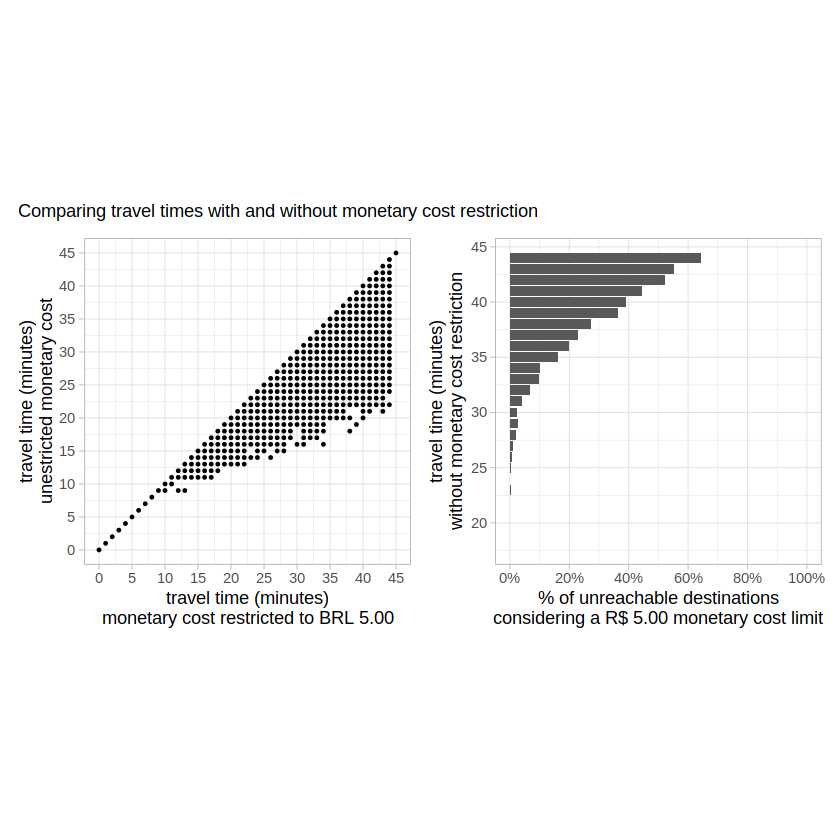
Below, we can see a sample of the travel time differences with and without monetary
cost restriction. We can see that some trips are not affected at all (travel_time_unl == travel_time_500), some trips take a little longer to complete (travel_time_500 > travel_time_unl), and other trips cannot be completed at all (travel_time_500 == NA).
tail(ttm, 10)
| from_id | to_id | travel_time_500 | travel_time_unl |
|---|---|---|---|
| <chr> | <chr> | <int> | <int> |
| 89a90166da7ffff | 89a90129c2bffff | 38 | 36 |
| 89a90166da7ffff | 89a90129aa7ffff | 33 | 30 |
| 89a90166da7ffff | 89a90e93497ffff | 32 | 32 |
| 89a90166da7ffff | 89a90129807ffff | 39 | 38 |
| 89a90166da7ffff | 89a90129b5bffff | 34 | 34 |
| 89a90166da7ffff | 89a90129dd7ffff | 37 | 37 |
| 89a90166da7ffff | 89a90129bbbffff | 33 | 33 |
| 89a90166da7ffff | 89a90129bd7ffff | 26 | 26 |
| 89a90166da7ffff | 89a90129a47ffff | 19 | 19 |
| 89a90166da7ffff | 89a90166da7ffff | 0 | 0 |
The plots below show the overall distribution of the travel time differences and unreachable destinations:
# plot of overall travel time differences between limited and unlimited cost travel time matrices
time_difference = ttm[!is.na(travel_time_500), .(count = .N),
                      by = .(travel_time_unl, travel_time_500)]

p1 <- ggplot(time_difference, aes(y = travel_time_unl, x = travel_time_500)) +
  geom_point(size = 0.7) +
  coord_fixed() +
  scale_x_continuous(breaks = seq(0, 45, 5)) +
  scale_y_continuous(breaks = seq(0, 45, 5)) +
  theme_light() +
  theme(legend.position = "none") +
  labs(y = "travel time (minutes)\nunestricted monetary cost",
       x = "travel time (minutes)\nmonetary cost restricted to BRL 5.00"
       )

# plot of unreachable destinations when the monetary cost limit is too low
unreachable <- ttm[, .(count = .N), by = .(travel_time_unl, is.na(travel_time_500))]
unreachable[, perc := count / sum(count, na.rm = T), by = .(travel_time_unl)]
unreachable <- unreachable[is.na == TRUE]
unreachable <- na.omit(unreachable)

p2 <- ggplot(unreachable, aes(x=travel_time_unl, y=perc)) +
  geom_col() +
  coord_flip() +
  scale_x_continuous(breaks = seq(0, 45, 5)) +
  scale_y_continuous(limits = c(0, 1), breaks = seq(0, 1, 0.2),
                     labels = paste0(seq(0, 100, 20), "%")) +
  theme_light() +
  labs(x = "travel time (minutes)\nwithout monetary cost restriction",
       y = "% of unreachable destinations\nconsidering a R$ 5.00 monetary cost limit")

# combine both plots using patchwork
p1 + p2 + plot_annotation(subtitle = "Comparing travel times with and without monetary cost restriction")
4.2 Calculating accessibility with monetary cost#
Now, we can answer questions like “how many health care facilities one can access in 60 minutes using public transport, on a R$5.00 budget?”. We’ll do that below, and compare the results the accessibility unconstrained by monetary costs:
# calculate accessibility function
calculate_accessibility <- function(fare, fare_string) {
  access_df <- accessibility(r5r_core,
                             origins = points,
                             destinations = points,
                             departure_datetime = as.POSIXct("13-05-2019 14:00:00",
                                                             format = "%d-%m-%Y %H:%M:%S"),
                             opportunities_colname = "healthcare",
                             mode = c("WALK", "TRANSIT"),
                             cutoffs = c(60),
                             fare_structure = fare_structure,
                             max_fare = fare,
                             max_trip_duration = 45,
                             max_walk_time = 30,
                             progress = FALSE)
  access_df$max_fare <- fare_string
  return(access_df)
}
# calculate accessibility, combine results, and convert to SF
access_500 <- calculate_accessibility(fare=5, fare_string="R$ 5.00 budget")
access_unl <- calculate_accessibility(fare=Inf, fare_string="Unlimited budget")
access <- rbind(access_500, access_unl)
# bring geometry
access$geometry <- h3jsr::cell_to_polygon(access$id)
access <- st_as_sf(access)
Finally, we can plot the results and see how accessibility levels can differ quite substantially when we account for monetary costs.
# plot accessibility maps
ggplot(data = access) +
  geom_sf(aes(fill = accessibility), color=NA, size = 0.2) +
  scale_fill_distiller(palette = "Spectral") +
  facet_wrap(~max_fare) +
  labs(subtitle = "Effect of monetary cost on accessibility") +
  theme_minimal() +
  theme(legend.position = "bottom",
        axis.text = element_blank())

If you have any suggestions or want to report an error, please visit the package GitHub page.